ERP
Top 10 ERP Use Cases and Case Studies
Quick Answer (TL;DR) ERP systems solve real operational problems across 10 core business functions: finance, procurement, inventory, manufacturing,…


Decision-making is central to business. Making the right decision at the right time can make a real difference. Change can be difficult, but certain critical decisions need to be made early to avoid mishaps and enjoy the benefits.
One such critical decision is migrating from Dynamics GP to Business Central before 2029. With the Microsoft Dynamics GP end of life, it’s time to migrate to Business Central. This marks the start of your ERP modernization journey and points to a brighter future.
GP retirement in 2029 may seem distant, but its implications are already here. Using the Great Plains ERP system is no longer beneficial, and you must take the necessary steps to move away from it; otherwise, you will have little time left, and any delay will be harmful.
When you avail Business Central migration services, it takes 9-18 months, and the sooner you start, the sooner you get results. Choosing a BC migration partner helps businesses migrate without errors or inconsistencies.
The Microsoft Lifecycle Policy indicates that Dynamics GP’s end of life is December 30, 2029.
Business Central takes its place as Microsoft announces it as the ERP for all SMBs. This change is positive because Microsoft chooses innovation and advancement, and so should businesses.
Businesses that choose the Microsoft Business Central upgrade should not worry about change, as Dynamics 365 consulting partners are ready to help implement the system. So, it’s better not to wait for the end date and step into a world of transformation and advancement.
You can also get insights about ERP systems by exploring Micro-Vertical ERP systems.

With the Microsoft Dynamics Great Plains end of life, you face loss and new risks that can disrupt your business. These risks include security, compliance, partner availability, and crisis management.
The longer you wait, the more you lose.
So, as Microsoft has announced the discontinuation of the system, it will no longer offer security updates. If your business runs into a problem, it may remain unresolved.
As Microsoft discontinues the Dynamics GP lifecycle, it will no longer offer compliance support. If you belong to an industry that requires strict compliance, your business is at risk.
Partners will also move from GP to BC migration, and they will no longer offer support as the Dynamics GP support end dates are announced. As the Business Central Partner
would be occupied with clients who need implementation, you might miss out on a reliable partner who is busy with another project.
If you do not plan to migrate on time, you miss out on partner availability. This can lead to a risky migration and a crisis.
So, planning on time is essential. A delayed ERP migration will cost you a lot, as you will rush the implementation and miss essential resources needed for the migration.
The first question that pops into your mind is: why is Business Central, not GP? To answer that, you need to understand the difference between Microsoft Dynamics GP and Dynamics 365 Business Central.
The biggest shift is moving from on-premises to the cloud across both systems. Dynamics GP is installed on the business’s own servers, while the cloud is accessed over the internet.
GP offers manual updates, whereas the cloud offers automatic updates. The updates are expensive and disruptive in GP, but not in the cloud.
GP requires higher maintenance costs, whereas Business Central is cost-effective. Moreover, Dynamics GP has a rigid structure that is difficult to customize, whereas Business Central is flexible.
| Action | Microsoft Dynamics GP | Dynamics 365 Business Central |
| Deployment | On premise | Cloud |
| Customization | Version upgrades | updates |
| Integration | Heavy customization | Extension based |
| Updates | Limited | Native |
| Licensing Model | Perpetual | Monthly subscription |
Business Central is the successor to Dynamics GP and Dynamics NAV, as it has shifted to the cloud and offers greater flexibility and ease of use. It integrates seamlessly with Microsoft products, enabling smooth data flow across applications.
Power BI and Power Automate integration helps you automate and handle finance without any hassle. The fundamental problem was the GP upgrade due to a version lock. Business Central offers extension-based customization that eliminates this issue.
Microsoft-provided tools perform the data migration. The data migrated includes master data, system data, transactional data, historical data, and classes for customers, vendors, and items.
The data migration time is not fixed, as it depends on the amount of data being migrated. Avoid migrating data to a production environment that is already in use. This will overwrite data that is useful to the business.
During the GP to D365 BC migration, data is migrated from table by table, and each table is tracked to avoid mistakes or inconsistencies. The tables and schema need to match for data migration.
That is why migrating data to a sandbox environment and then moving it to production is necessary.
The next big question is the timeline. The most frequently asked question is how long it takes to implement the system. There is a rough estimate of 4-24, but it depends on what the business wants and how.
Customization, modules, features, and advanced Microsoft Dynamics 365 Business Central integration all affect the timeline.
Small businesses that need basic, core processes may need 4-9 months to install the system.
Mid-market enterprises need 9-14 months with customization, extensions, integrations, and
If a business has complex processes and unique workflows, it needs proper data migration, multi-currency support, and entity support, which can take 12-24 months.
Waiting for the deadline is a miscalculation and mismanagement, as it will cost you a lot in the long run. You will have to wait for the partner to be free, pay more, and deal with a system that is no longer reliable.
Planning early helps you avoid bottlenecks that can get in the way of your success.
The cost of the migration also depends on what you want and the scope of your project. We’ll break down the cost to help you understand it and build a realistic budget.
Partner fee
$25K – $150K+
Licensing
Business Central Essentials vs. Premium
$70 – $100/user/mo
Data migration
$5K – $30K
Heavily dependent on data quality

So, when I say start now, I mean it’s urgent. You need to understand the urgency of your situation. Delaying the migration and keeping the outdated system is not optional.
When Microsoft 365 SMB ERP discontinues a product, you must understand that it is no longer relevant today. It has already aged, and if you keep using it, you will be at a loss.
If you start your GP-to-D365 BC migration in 2026, you are more likely to succeed early.
You will complete the business using it today, but the longer you delay, the further behind you will fall. As you waste a year, you stay years behind your competitors.
First, you need a partner to implement the system. And their availability is important. All businesses will acquire the best Microsoft Dynamics 365 ERP consulting partner, and if you are late, your preferred Dynamics 365 partner will already be booked, so you won’t get their services. This can put you in a difficult position.
The biggest concern is Dynamics 365 Business Central implementation cost. When you are migrating, you need to invest. Right now is the best time to get the best prices. Later, demand will create issues, and you will have to pay more to get the same services.
If you migrate now, you can plan everything accordingly. You get the right resources, and availability is ensured. Delays won’t get you what you want.
Modernizing right now means competing with those who are doing the same. If you don’t do it now, you will be left behind.
Starting today means you need 10-14 months; after that, you will see results. So it’s all about collaboration today that will give you the benefits in the future.
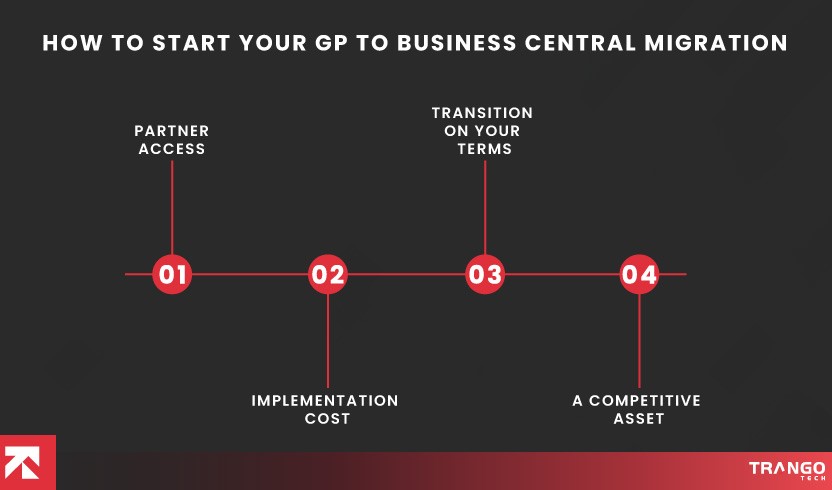
Now the question is: how to start the GP-to-Business Central migration? The answer is simple: follow a step-by-step process to get where you want to go.
The first step is to assess your current GP environment and document it. Extensions, integrations, users- everything.
Choosing a partner is the most critical decision. Choose wisely, as not all partners have experience with GP migration. Ask for demos, hold meetings, discuss scope, review feedback, and then select the partner.
The next step is data migration, and you need a data migration strategy. First, migrate the master data; then migrate historical and other data.
Phased migration is better for migrating historical data over time.
Change management is essential to the migration. Provide teams with relevant training, rather than limited workshops that don’t answer all their questions.
Test the system in the sandbox environment for a smoother go-live. The partner must also offer initial hypercare to mitigate issues that may arise after go-live.
Also Read: Business Central vs Custom ERP for SMEs in the USA: Where Textbook Advice Falls Apart

As we discussed, partner selection plays a major role in the migration, so you need to decide carefully. One of the reasons why Out-of-Box Business Central Fails is that the partner is not competent.
The Business Central partner must possess the following qualities:
Not all partners are reliable; some lack migration experience. So you need a partner with GP migration experience.
Then comes the industry experience. Choose a partner who knows your industry, understands workflows, and offers solutions accordingly. We are not looking for generic solutions.
The right partner also rescues a failed Business Central Implementation.
Post-implementation Business Central support services are very important, and you should take them seriously. If you miss this, it will cost you in the long term. Implementing the system is not enough. To succeed, you need to run it stably.
Many Dynamics partners are not transparent with pricing. Ask about the price and avoid hidden changes that cost you in the long term. Pricing affects your implementation, so make it clear from the beginning.
As we know, Business Central aligns with current technology and helps you avoid processes that do not benefit you in the long term.
Upgrading offers significant value, with payback visible within 6 months. The improved ROI, productivity, and cost savings were visible in 3 years.
Moving to Business Central reduced manual operations, improved data access, and lowered maintenance and infrastructure costs.
Itis also an opportunity to move ahead and reduce the technical debt that’s holding you back. Moreover, moving to Business Central now will give you access to promotional discounts. You can also avoid the additional costs of premises systems if you are eligible to acquire the system. A consultant will help you with this.
Microsoft Dynamics 365 Business Central is your go-to solution, offering everything under a single roof. You can automate all your processes, including finance, HR, sales, inventory, and supply chain.
Business Central helps you automate processes and maximize productivity. No more data redundancies and costly mistakes that lead to penalties and compromise your business reputation.
Now you can utilize AI to boost your efficiency, productivity, and growth using Copilot in Dynamics 365 Business Central. Prebuilt agents, automation, and updated workflows save you from falling behind. This advanced technology is essential to streamline your operations more efficiently.
Users can thrive with a modern interface that makes work easier and improves their experience. The system’s look and feel also drives success. Each day, when users use an intuitive system, they can thrive and make the most of it.
GP upgrades took longer and were full of hassles. They took longer to update the system. This slowed the business’s progress, as outdated systems continued to hold it back. In comparison, Business Central offers automatic background updates. Eliminating manual updates, accessing the latest features, and improving security help accelerate progress.
Security is a major concern for every business. Every day, when they use the system, their main concern is whether their data is safe and secure. Does the system offer enough security? The answer is yes; Microsoft spends billions on its security. Microsoft Azure offers complete security and data privacy.
Every business seeks a system that can grow with it. Business Central is a cloud-based solution that grows alongside the business. There are no additional costs or requirements for the business to adhere to. The system can scale whenever needed.
Business Central lets businesses integrate with and use other tools like Teams, Outlook, and Excel without hassle. The all-in-one availability makes the system worth using. Operations run more smoothly with less chaos.
Business Central helps in analyzing KPIs in real time. Interactive dashboards, preconfigured reports, and centralized data access let you analyze business growth in real time.
You know the clock is ticking loudly, as Microsoft has shared the date for discontinuing the system. The more you delay, the more trouble you get into. The final chapter of the old ERP system is the start of your new journey towards transformation.
Microsoft Dynamics 365 Business Central ERP is here to stay and make your business a success in this competitive world. Using GP after discontinuation exposes your business to new risks, including security patches, compliance issues, a shrinking partner ecosystem, and system failures.
That is why it’s better to migrate early to take advantage of a cloud-native platform with built-in automation, remote access, mobility, integration, and support.
Q1. Why do you need to migrate to Business Central?
Business Central is the new cloud-native platform introduced by Microsoft to replace GP. You need to switch to Business Central to use the most relevant, advanced system available today.
Q2. When does Microsoft Dynamics GP reach end of life?
Microsoft has announced the end of life, with the date set for December 30, 2029.
Q3. How long does it take to migrate to Business Central?
It depends on the scope of your project and can take 4 to 24 months.
Q4. What are the risks of waiting until 2029 to migrate?
Using GP until 2029 is not beneficial; it will create problems because Microsoft no longer supports it. It creates financial, operational, and technical issues that stunt business growth.
Q5. Why migrate from Dynamics GP to Business Central?
Migrating to Business Central right now will save you from:
Q6. What will happen if I delay the migration?
Delaying the migration means you are risking:
Q7. How to select a partner?
To select a partner, you must assess:
Q8. What is the cost of migrating from GP to Business Central?
The cost of basic migration ranges from $10,000 to $30,000, but can exceed this for more complex migrations.
Is Business Central better than Dynamics GP?
Yes, it is better than Dynamics GP, offering advanced features and AI automation with greater flexibility and scalability.
Calculate your complete ERP implementation cost using our cost calculator.
Calculate now!
Your Email Address Will not be published. Required Fields Are Marked
Quick Answer (TL;DR) ERP systems solve real operational problems across 10 core business functions: finance, procurement, inventory, manufacturing,…

Quick Answer (TL;DR) Companies switch from Odoo to Business Central when they need a system that can scale…

Quick Answer (TL;DR) The top 20 CRM software options in 2026 include Salesforce Sales Cloud, Microsoft Dynamics 365…
Quick Answer (TL;DR) ERP systems solve real operational problems across 10 core business functions: finance, procurement, inventory, manufacturing,…
Quick Answer (TL;DR) Companies switch from Odoo to Business Central when they need a system that can scale…
Quick Answer (TL;DR) The top 20 CRM software options in 2026 include Salesforce Sales Cloud, Microsoft Dynamics 365…
If you are confused and need expert advice to transform your business, our experts are available 24/7.
Don't waste a single second, as you will be left behind while others are already ahead, moving fast. Start Now!
Trusted by Clients Worldwide: Rated 4.9 Star