


Power Bi
Power BI for Mac: How to Install, Access & Use It in 2026
Quick Answer (TL;DR) Power BI does not offer a native connection to Mac, so you can access it…

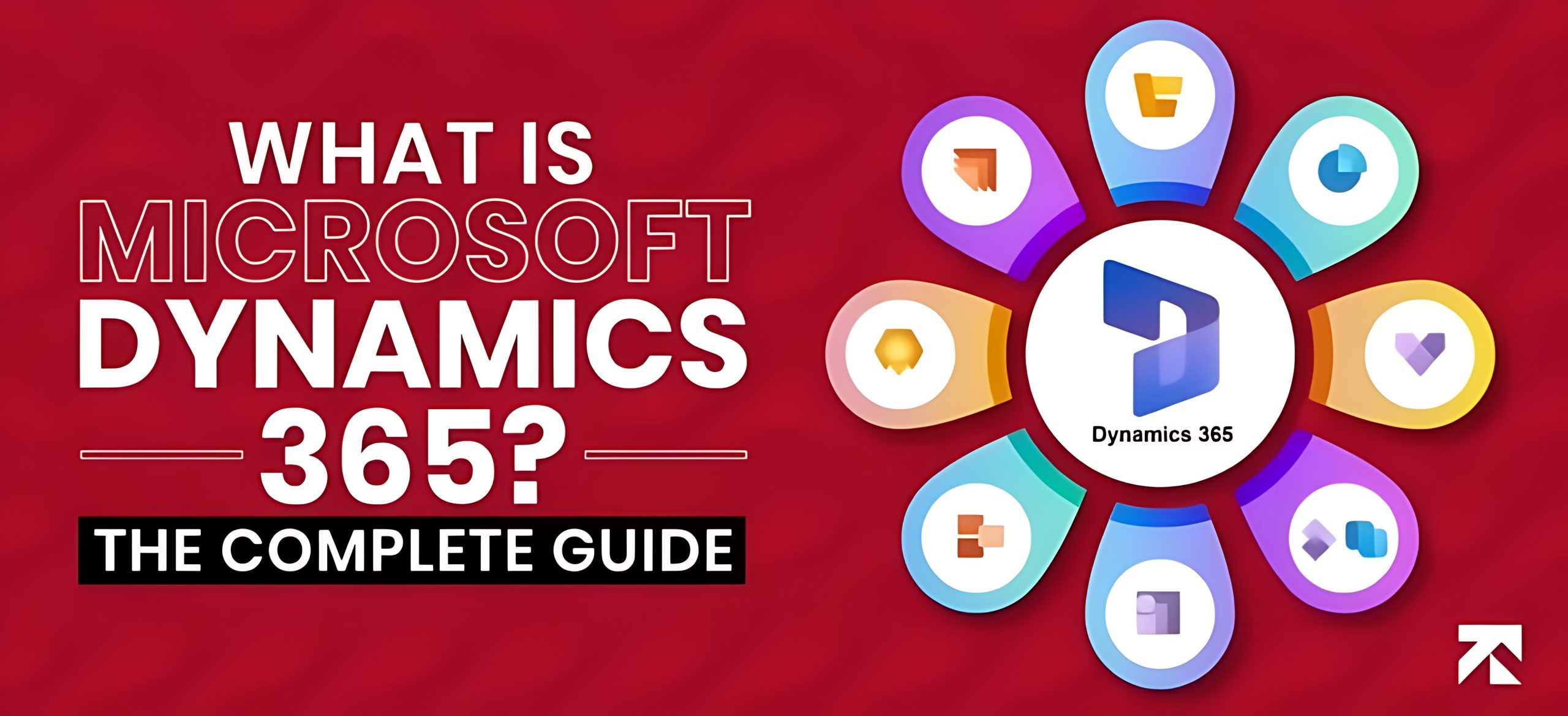
All-in-one platform: Dynamics 365 combines ERP and CRM in a single cloud-based system, replacing separate finance, HR, sales, and service software.
Modular and scalable: Buy only the apps you need (Business Central, Finance, Sales, Supply Chain, etc.) and expand as you grow. Business Central is the go-to ERP for SMBs.
Smart and connected: Built-in AI, Power BI, and Power Platform integration, plus connections to tools like Shopify, Magento, and Salesforce.
Pricing: Roughly $80 to $210 per user/month depending on the app, plus implementation and training costs.
The implementation timeline varies from 3 to 24 months.
Bottom line: A secure, future-ready platform, best implemented with a certified Dynamics 365 partner.
Microsoft Dynamics 365 offers ERP and CRM applications to businesses seeking a solution to streamline their operations. The apps are available for a subscription fee of $8/user/month, and implementation takes 3-24 months.
D365 is an intelligent business platform that connects finance, sales, customer service, operations, and HR to work together seamlessly is the need of the hour. This is why you need to know what Microsoft Dynamics is, and how working with a trusted Microsoft Dynamics 365 partner can help implement it effectively to solve these challenges.
Dynamics 365 is a cloud-based suite of ERP (Enterprise Resource Planning) and CRM applications. It is designed to manage business operations, improve customer experiences, and drive growth with real-time insights.
Here is the Microsoft Dynamics Overview, explaining what it is and why it matters. Also explore the top 20 ERP systems that top the list.
| Core App Module | Platform Category | Target Company Size | Core Capability | Base List Price | Attach License Price | Primary Competitor Alternatives | Main Implementation Risk |
| Business Central | ERP | SMB to Mid-Market | Core financials, inventory tracking, and light manufacturing | $80 /user/mo | $20 /user/mo (Essentials) | NetSuite, SAP Business One | Data Messiness: Migrating messy old legacy records slows launch times. |
| Finance | ERP | Enterprise | Multi-currency reporting, global automation, and predictive analytics | $210 /user/mo | $30 /user/mo | SAP S/4HANA, NetSuite | Scope Creep: Over-complicating workflows instead of using native system layouts. |
| Supply Chain | ERP | Enterprise | Advanced shop-floor control, demand forecasting, and asset tracking | $210 /user/mo | $30 /user/mo | NetSuite, SAP S/4HANA | Change Resistance: Complex multi-national operational workflows stall user adoption. |
| Sales | CRM | All Sizes | Lead-to-opportunity pipeline tracking and revenue forecasting | $65 /user/mo (Enterprise: $105) | $20 /user/mo | Salesforce | Low Integration: Neglecting native Microsoft 365 / Outlook hooks reduces ROI. |
| Customer Service | CRM | All Sizes | SLA tracking, ticketing workflows, and customer service desks | $50 /user/mo (Enterprise: $105) | $20 /user/mo | Salesforce Service Cloud | Siloed Channels: Failure to correctly map multi-channel queues slows resolution. |
| Field Service | CRM | Mid to Enterprise | Work-order scheduling, automated routing, and mobile dispatches | $105 /user/mo | $20 /user/mo | Salesforce Field Service | Mobile Adoption: Field techs rejecting the mobile app layout down in the field. |
| Project Operations | ERP & CRM | Mid to Enterprise | Multi-phase resource utilization and project contract management | $135 /user/mo | $30 /user/mo | FinancialForce, NetSuite SRP | Tracking Gaps: Staff skipping daily timesheet data entry breaks the revenue model. |
Many business leaders have a common question in mind: “What is Microsoft Dynamics 365 used for?” — the simple answer is its ability to manage both ERP and CRM functions under one unified platform.
Microsoft Dynamics 365 offers intelligent business applications that unify ERP and CRM capabilities into a single cloud platform. It eliminates the need to buy separate software for accounting, HR, sales, or customer service. Now businesses can get everything in one connected ecosystem.
Let’s learn what is Dynamic 365 by exploring what it brings together:
This integration enables businesses to gain real-time visibility, enhance decision-making, and foster collaboration across all functions.

If you are curious about what is Microsoft Dynamics, it’s an all-in-one platform that offers a collection of modular applications. Additionally, you can purchase only the modules you need or combine them, depending on your business needs.
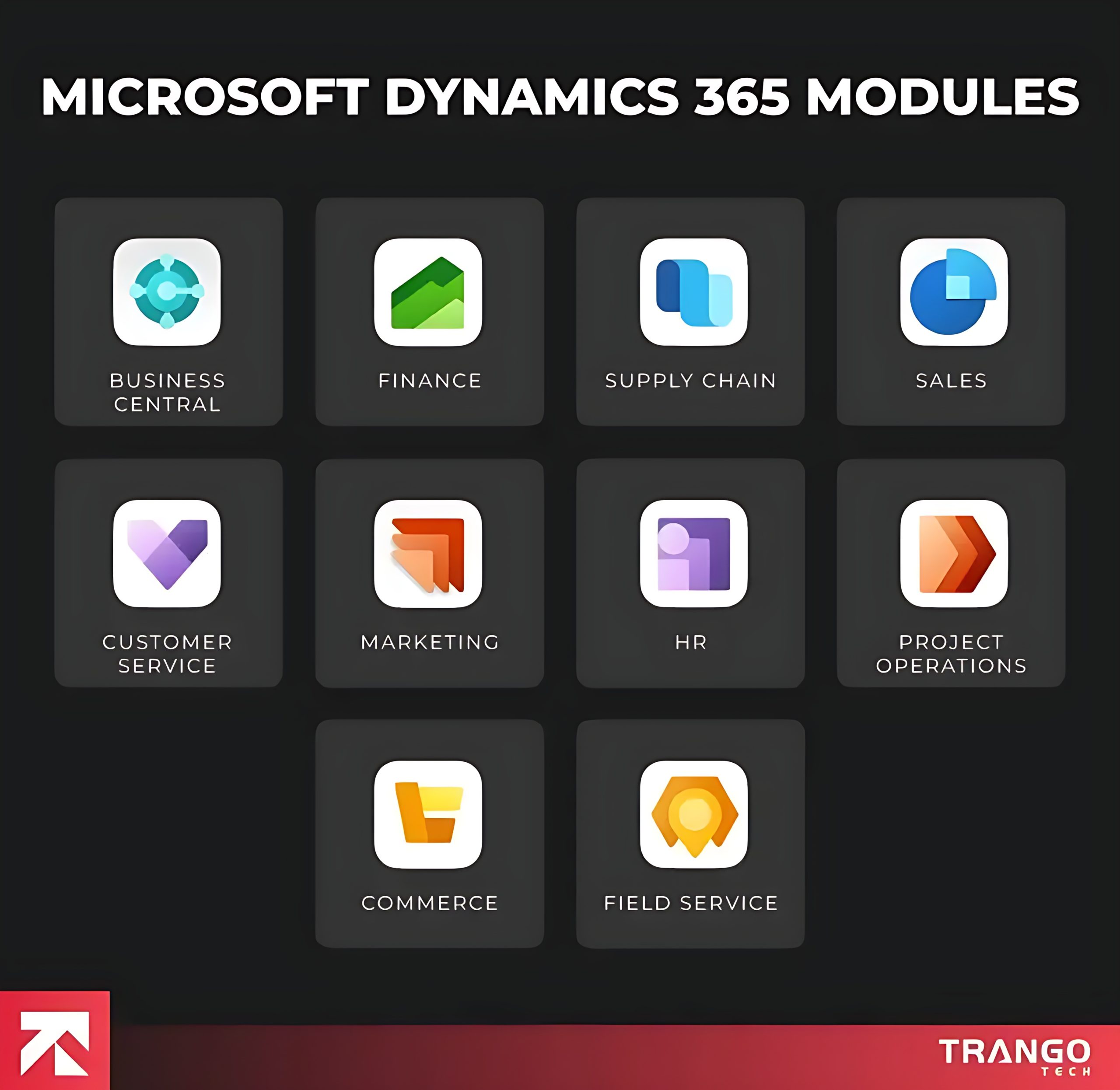
| App | ERP or CRM | Best for | Core Capability | Starting Price |
| Dynamics 365 Business Central | ERP | SMB all-in-one operations | Core financials, inventory, and light manufacturing | $80/user/mo |
| Dynamics 365 Finance | ERP | Enterprise-scale financial management | Global multi-currency reporting, automation, and predictive analytics | $210/user/mo |
| Dynamics 365 Supply Chain Management | ERP | Large-scale logistics, manufacturing, and warehousing | Advanced shop-floor control, demand forecasting, and inventory tracking | $210/user/mo |
| Dynamics 365 Sales | CRM | Pipeline and deal tracking | Lead-to-opportunity management, sales forecasting, and basic forecasting | $65/user/mo |
| Dynamics 365 Customer Service | CRM | Omni-channel helpdesk and support | SLA tracking, ticketing workflow, and knowledge base hosting | $50/user/mo |
| Dynamics 365 Field Service | CRM | On-site technical dispatches and operations | Work-order scheduling, automated routing, and mobile asset tracking | $105/user/mo |
| Dynamics 365 Project Operations | ERP & CRM | Professional services delivery teams | Multi-phase resource utilization, time entry, and contract management | $135/user/mo |
| Dynamics 365 Human Resources | ERP | Centralized employee tracking | Automated onboarding, leave management, and benefits structures | $135/user/mo |
| Dynamics 365 Commerce | ERP | Omnichannel retail operations | POS terminal operations, e-commerce backend unified with inventory | $180/user/mo |
| Dynamics 365 Customer Insights | CRM | Marketing automation and customer data | Cross-channel customer data platform (CDP) segmentation | $1,700/tenant/mo |
Let’s discuss them in detail.
Dynamics 365 Business Central is a cloud-based ERP solution providing scalability and accessibility with ease. All small and medium-sized businesses (SMBs) can automate finance, sales, supply chain management, inventory management, purchasing, and project management.
It paves the way to success, an excellent relief for businesses. Organizations no longer rely on manual, outdated processes. They can remove bottlenecks instantly through real-time cash flow tracking and direct management of purchasing or vendor relationships.
You don’t need to juggle between apps as it integrates with Microsoft 365 (including Outlook and Excel), which enhances workflow efficiency. Employees can approve invoices, send purchase orders, and analyze budgets all within one application.
Choosing a certified Business Central Partner will help implement the basic features, such as finance, and gradually add more advanced capabilities through Business Central implementation services.
Also Read: Top 15 Dynamics 365 Partners in USA (2026 Updated)
As the name suggests, Dynamics 365 Finance takes care of all your financial operations. Large enterprises that need advanced financial management and compliance tools can benefit from it.
Dynamics 365 provides deep insights to enhance an organization’s financial health by consolidating global operations, automating accounts payable and receivable processes, and managing complex budgets.
Dynamics handles multi-currency transactions to provide the ease of doing business worldwide. Companies need to stay ahead by leveraging AI to forecast cash flows, predict payment delays, and optimize financial decision-making. They can step into the world of AI while maintaining regulatory compliance across different jurisdictions. Advanced reporting tools ensure transparency and reduce audit risks.
CFOs and finance teams must also review complex and sensitive data to ensure accuracy. They can now utilize Power BI to transform raw financial data into actionable insights for informed strategic planning. A simple example of how Dynamics 365 works is its ability to connect front-office and back-office operations within a single intelligent ecosystem.
All manufacturing, logistics, and distribution businesses can manage inventory, production schedules, procurement, and warehouse activities without wasting time. Dynamics 365 Supply Chain Management automates all these businesses.
The system integrates with IoT (Internet of Things) and AI capabilities that help detect potential equipment failures, predict demand. Now they can take corrective actions before disruptions occur.
The system handles all essential tasks, including production runs, waste minimization, and ensuring that customer orders are fulfilled promptly. Real-time tracking of materials and logistics helps prevent delays and ensures customer satisfaction through timely deliveries.
It’s a valuable addition to your supply chain as it proves agile, data-driven, and competitive.
Businesses delivering client-based projects need to utilize Dynamics 365 Project Operations. Professional services firms, construction companies, or engineering consultancies. It unifies project planning, resource allocation, cost management, and billing into a single platform.
Managers can easily track projects from individual tasks, assign resources based on availability and skill sets, and monitor project profitability in real-time. Integrate Dynamics 365 Finance to view all project costs, invoices, and payments.
Microsoft Teams allows teams to communicate easily as everyone stays updated on timelines and deliverables. Timely project delivery is ensured while maintaining high levels of client satisfaction. You can also incorporate an AI note taker for Teams to capture meeting details automatically and keep everyone aligned.
Dynamics 365 Commerce is designed for retail and e-commerce businesses to enhance the shopping experience. Physical stores and online channels can utilize Dynamics 365 Commerce as a unified commerce platform to manage product catalogs, pricing, promotions, and customer loyalty programs across multiple channels in real-time.
Stores can handle transactions, track inventory, and access customer profiles instantly with a POS solution. Businesses can enhance their customer experience by offering personalized shopping recommendations tailored to past purchases and browsing behavior.
Connecting customer insights with supply chain and inventory data enables businesses to offer the right product at the right time through the right channel. This innovative strategy instantly boosts sales.
Dynamics 365 Human Resources modernizes workforce and HR management with a comprehensive system. Organizations can simplify employee onboarding, payroll, hiring, and data management with Dynamics 365. HR can easily track employee information, manage payroll and benefits, and oversee training programs. They can ensure compliance with labor laws.
It not only helps with administrative tasks but also has advanced tools that empower employees to take control. Self-service portals enable employees to update their information, submit leave requests, and enroll in training programs.
Data is presented in a way that makes it easy for managers to analyze workforce trends and performance reviews. Nothing is based on guesswork or intuition, as it drives informed decision-making. This saves time for more productive work. The most significant benefit is its integration with LinkedIn Talent Solutions, making recruitment and onboarding easier.
Dynamics 365 Sales streamlines sales processes to foster stronger relationships, accelerate deal cycles, and achieve higher win rates.
Businesses gain a comprehensive view of customer interactions, manage leads, track opportunities, and forecast revenue — all within one system. The AI model recommends next-best actions, identifies the most promising leads, and even predicts customer needs based on historical data.
Integration with Outlook adds more success as teams can send emails, book meetings, and log customer interactions directly from their inbox. Managers don’t need to juggle a lot as they can monitor performance metrics through dashboards.
Dynamics 365 Sales centralizes data and provides salespeople with up-to-date, accurate information, resulting in stronger relationships, faster deal cycles, and higher win rates.
Also Read: WMS Integration With ERP (Complete Guide)
Customer service is the key to success. It is the backbone of any business, and Dynamics 365 Customer Service delivers personalized, efficient, and consistent support across multiple channels. From phone, email, chat, social media, to self-service portals, we’ll get you covered.
Agents can track issues to know the current status of the case and the management system. Built-in AI automates routine tasks and improves first-call resolution rates.
Moreover, self-service knowledge bases improve customer knowledge and reduce the need to contact support for simple queries.
Agent performance and customer satisfaction scores are set to refine service strategies. Customers are valued through resolving simple tickets or managing complex service requests.
For businesses planning their ERP alongside CRM, using a Business Central implementation cost calculator can help estimate overall investment and align service operations with budget expectations.
For companies that provide on-site services — such as equipment maintenance, utilities, healthcare, or facility management — Dynamics 365 Field Service caters to all companies providing on-site services. Businesses manage work orders, schedule technicians, and ensure timely service delivery to their customers.
AI handles all the work by scheduling, optimizing technician routes, and assigning jobs based on skills and availability. The mobile app provides access to all job details, parts inventory, and customer history. Field workers can access it to ensure they arrive fully prepared.
HoloLens or augmented reality (AR) shows expert guidance without needing a second visit. This drives faster and more accurately with minimal downtime.
Dynamics 365 Customer Insights helps create personalized journeys. It generates sales when they are ready to buy. Creating multi-channel campaigns (email, social media, webinars, and events) with customer segmentation tools enables the delivery of targeted messages to specific audiences.
AI is the most effective campaign. Integration with Dynamics 365 Sales improves collaboration between the marketing and sales teams. This prevents lead leakage and improves conversion rates. It’s an end-to-end solution to boost brand awareness, generate leads, and increase ROI on marketing spend.
AI-driven applications are a key strength of any business in this era. Dynamics 365 modules have tools offering Sales Insights, Customer Insights, and Fraud Protection. Insights into analyzing customer behavior and buying patterns facilitate the marketing and sales team to create strategies that boost sales.
Sales Insights helps the sales team to work on the best leads, and Customer Insights unifies customer data to create a single, 360-degree customer profile.
Dynamics 365 integrates with Microsoft’s Power Platform seamlessly.
This ecosystem enables Dynamics 365 to be highly customizable, ensuring it adapts to the unique needs of each organization.
Microsoft Dynamics 365 can easily integrate with third-party applications. Businesses rely on specialized tools, and Dynamics 365’s flexible integration services enable direct connections between external platforms and the ERP and CRM ecosystem.
Dynamics 365 magento integration enables e-commerce businesses to access data in real time. The seamless flow of data between online stores and back-end operations help make prompt decisions to create better customer experiences.
Integrations with Shopify, Salesforce, or DocuSign eliminate data silos. Businesses can manage operations more efficiently by avoiding the need to switch between disconnected tools.
Dynamics 365, partnering with business-critical applications, helps companies unlock a connected, future-ready ecosystem. Growth and productivity are guaranteed in this case.
Microsoft Dynamics 365 enables organizations to reap numerous benefits. To know what Microsoft Dynamics 365 is used for, you must explore why businesses must adopt it due to its benefits.

Manual work is outdated and shows how far you are from success. A unified business platform where all apps integrate helps you abandon scattered systems and the hassle with spreadsheets.
Microsoft Dynamics 365 is a unified platform offering Enterprise Resource Planning (ERP) and Customer Relationship Management (CRM) capabilities. Managing multiple software applications for finance, sales, operations, and customer service can be a challenging task.
Businesses can utilize Dynamics 365, which eliminates data silos and provides access to a single source of information. A unified view of operations enables faster responses to challenges and opportunities.
Dynamics 365 is a highly scalable system that grows with you. Organizations can implement only the modules they need, and then expand as requirements evolve. This cloud-based solution helps scale resources up or down depending on demand.
They can avoid the high costs of maintaining on-premise infrastructure. This flexibility makes Dynamics 365 remain relevant and useful to every business with complex operations.
Also Read: NAV to Business Central: What Actually Changes
Dynamics 365 integrates with other Microsoft products, including Outlook, Excel, Teams, Power BI, and the Power Platform (Power Apps, Power Automate, and Power Virtual Agents). This interoperability facilitates the user.
Sales teams can update CRM records in real-time reports into Excel. Dynamics 365 enables businesses to achieve greater productivity and streamline their workflows.
Analyzing customer behaviour has to be easier. Artificial intelligence (AI) and machine learning capabilities help uncover opportunities. Businesses utilize accurate and up-to-date information to become proactive rather than reactive.
Meeting customer expectations helps businesses deliver personalized, consistent, and engaging experiences. Detailed customer profiles enable the creation of tailored communications that meet individual needs.
Marketing automation enables sales teams to close deals more efficiently and effectively. By anticipating customer needs, they can offer personalized services. Organizations can foster long-term loyalty.
Manual processes and outdated systems must be abandoned quickly. Dynamics 365 streamlines workflows to boost efficiency and removes all errors and bottlenecks instantly. Supply chain modules reduce shortages and overstock issues. Automating repetitive tasks enhances productivity, accuracy, and operational efficiency.
Investing in multiple standalone systems can be expensive and inefficient. Dynamics 365 offers a cost-effective solution by consolidating critical business functions into a single platform.
Business Central costs between $25,000 and $100,000+, depending on requirements, being an affodable solution
Since it’s subscription-based, companies avoid significant upfront costs and instead pay for only what they use. The efficiencies gained from automation, better decision-making, and improved customer satisfaction directly contribute to a higher return on investment (ROI).
Over time, the system pays for itself by reducing operational costs and driving revenue growth.
Data security and regulatory compliance are essential for maintaining customer trust and confidence. Compliance saves businesses from substantial penalties. Utilizing Dynamics 365 would be the best decision, as its world-class security features help maintain customer trust and confidence.
Multi-factor authentication, data encryption, and advanced threat protection are some of the key features of the system. Compliance with global standards provides the confidence to run a business without concerns about legal risks. This robust security framework maintains customer trust.
The world has undergone significant changes, allowing you to work from anywhere. There are no restrictions on working from a specified location or office. This is why employees require access to business systems, even when they are out of the office or traveling. Dynamics 365 offers mobile-friendly applications, allowing you to connect with clients and continue your activities on the go.
From approving purchase orders to accessing case histories remotely, everything is at your fingertips. Now there are no location barriers in doing business.
Dynamics 365 provides regular updates that do not disrupt business operations. It equips organizations with the latest technology, enabling businesses not only to modernize their current operations but also to secure long-term access to evolving digital tools.
Microsoft Dynamics 365 is ideal for businesses seeking a powerful ERP or CRM solution. Still, it may be costly and time-consuming, and it requires heavy partner dependency and a steep learning curve.
Custom code writing increases the price.
Businesses need an external consultant to implement the solution.
D365 F&O requires strict licensing, which makes compliance difficult and increases costs.
Teams need training to use teh system who are not familiar with the Microsoft interface.
Microsoft uses a modular licensing model for Dynamics 365. Businesses only pay for the apps they need. Here is the Dynamics 365 pricing overview:
| App | List Price / User / Month | Attach License Price | User Type |
| Business Central Essentials | $80 | $20 | Full |
| Business Central Premium | $110 | N/A (Must be base) | Full |
| Sales Enterprise | $105 | $20 | Full |
| Sales Professional | $65 | $20 | Full |
| Customer Service Enterprise | $105 | $20 | Full |
| Customer Service Professional | $50 | $20 | Full |
| Field Service | $105 | $20 | Full |
| Finance | $210 | $30 | Full |
| Supply Chain Management | $210 | $30 | Full |
| Project Operations | $135 | $30 | Full |
| Dynamics 365 Team Members | $8 | N/A (Standard flat rate) | Team Member (Light read/write) |
| F&O Operations Device | $85 | N/A (Per machine instance) | Device (Multi-user warehouse) |
Additional costs may include:
A mid-market consumer goods distributor with more than 40 users needs to connect their warehouse operations to sales teams.
Business Central Essential and Sales Enterprise
A medical device company that needs to manage a 40-agent call center requires Dynamics 365 Customer Service.
Dynamics 365 Customer Service.
Customer Service Enterprise at $105/m = $4200/mo
| Company Size | Modules | Typical Duration | Typical Cost Range | Main Risk |
| SMB (10–100 employees) | Business Central Essentials + Sales Professional | 3 – 4 months | $25,000 – $75,000 | Data Messiness: Migrating uncleaned records from QuickBooks or scattered Excel sheets slows configuration. |
| Mid-Market (101–500 employees) | Business Central Premium, Customer Service, Field Service | 4 – 8 months | $75,000 – $250,000 | Scope Creep: Over-complicating workflows instead of relying on out-of-the-box system layouts. |
| Enterprise (500+ employees) | Finance, Supply Chain Management, Customer Insights | 9 – 14+ months | $250,000 – $750,000+ | Change Resistance: Low internal user adoption across complex, multi-national operational workflows. |
Discover ERP implementation costs to get an estimate of how much it is going to cost you. Use our ERP implementation cost calculator to estimate costs and plan your budget effectively.
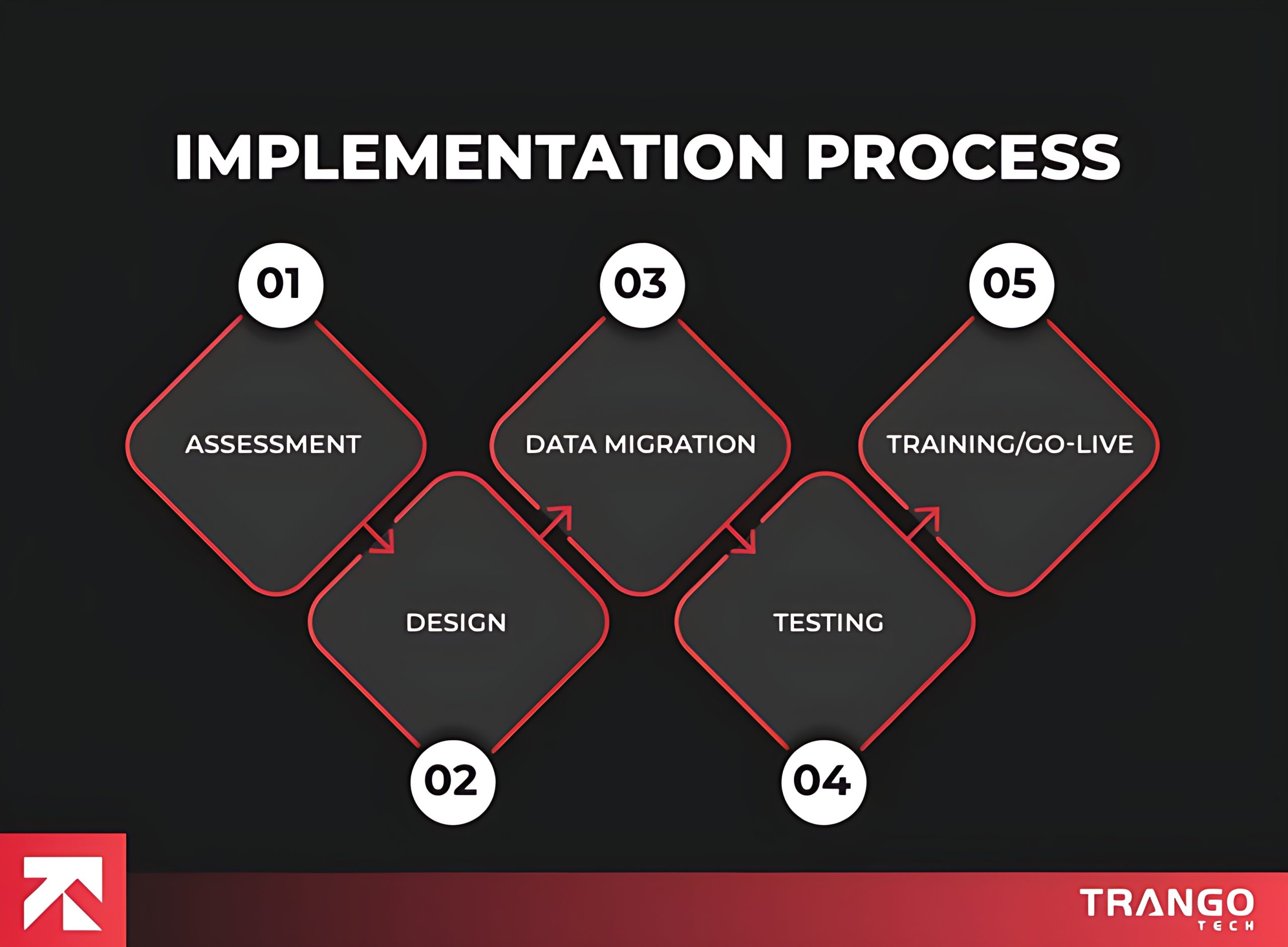
Steps usually include:
This is the foundation phase that involves assessment and discovery. All business stakeholders sit with the consultant to provide complete information about the business. This helps in understanding the organization’s unique requirements.
These discovery workshops enable the implementation team to gain a deeper understanding of existing processes, pain points, and goals for adopting Dynamics 365. They assess the current functioning of various departments to identify gaps that require attention and improvement.
Develop a clear roadmap that defines the project scope, priorities, and success criteria. This phase is a strategic enabler of business transformation.
The second step is designing the Dynamics 365 environment. The system is configured to align with workflows.
Customization of specific fields, forms, and dashboards is conducted. Integration with third-party applications is also catered to. Microsoft’s Power Platform nullifies heavy coding. The system reflects the company’s unique operations, which align with their operational model.
Data migration is the most crucial part. Data migration involves accurately and efficiently cleansing, mapping, and importing records to ensure seamless data integration. The data is handled carefully to avoid data duplication, corruption, or loss.
Test migrations are performed to avoid any loss. Accurate data access, clean, reliable, and consistent data for day-to-day decision-making.
Testing is performed before go-live to check how the system works. This phase includes unit testing (validating individual modules), system testing (ensuring end-to-end workflows function correctly), and user acceptance testing (UAT).
Validation checks confirm the smooth working of the third-party systems integrations. The data is checked, and issues are identified promptly, helping to mitigate them, resulting in a stable, compliant, and ready environment for full-scale adoption. The testing phase reduces risks.
Nothing is possible without proper training. Hands-on workshops, role-based training sessions, and learning resources are provided to employees, enabling them to utilize Microsoft 365 to its full potential.
Users learn more about how the system works, particularly in their specific role. Change management strategies minimize resistance and improve productivity.
Go-live refers to the system being deployed and operational. Now, the employees start using Dynamics 365, and the implementation team monitors performance, resolves unexpected issues, and ensures a smooth transition.
But it doesn’t end here. After going live, our team provides technical assistance, performance optimization, updates, and continuous improvements. This keeps the system aligned, ensuring long-term success.

Microsoft stands out for its integration with Office tools, affordability for SMBs, and modular licensing.
| Metric | Microsoft Dynamics 365 | Salesforce | NetSuite | SAP Business One | Acumatica | Sage (Intacct) | Odoo |
| Pricing Model | Modular per-user base + attach model (Highly discounted secondary modules). | Modular per-user standalone model (Add-on clouds require high premium fees). | Annual base tenant platform fee + separate user seats. | Perpetual upfront software license fee + annual maintenance, or partner-hosted subscription. | Consumption-based resource pricing. Scales by commercial data transaction volume instead of user count. | Modular quote-based annual subscription calculated by core platform + active entities + user seats. | All-in-one subscription tier. Flat monthly per-user fee grants full access to all applications. |
| Best Fit Company Size | Flexible: Mid-market (Business Central) up to global enterprise (F&O). | Mid-market to global enterprise (best suited for CRM-heavy organizations). | Scaling mid-market companies and rapid-growth businesses. | Small to lower mid-market businesses seeking a stable operational core. | Growing mid-market businesses in manufacturing, construction, and distribution fields. | Mid-market to enterprise companies with complex multi-entity accounting structures. | Startups to expanding mid-market organizations looking for modular flexibility on a lean budget. |
| Microsoft 365 Integration | Native (Cloned UI, shared data across Teams, Outlook, Excel, and Power BI). | Third-party APIs required; relies on Salesforce-native Slack integrations. | Third-party integrations required (Data sync requires middleware apps). | Limited native hooks; requires partner custom configurations or connectors. | Fully supported via native integration plug-ins and an open .NET API architecture. | Requires custom API integrations or certified third-party connectors to bridge workflow data. | Requires dedicated connector modules or APIs from the Odoo app store marketplace. |
| Deployment | Public Cloud (Azure SaaS), Hybrid cloud, or localized data centers. | Strict multi-tenant public cloud SaaS architecture only. | Strict multi-tenant public cloud SaaS architecture only. | On-premise native server or managed private cloud hosting. | Highly flexible: Managed SaaS (AWS), Hosted Private Cloud, or traditional On-Premise. | Pure multi-tenant Public Cloud SaaS infrastructure framework. | Multi-tier deployment: Odoo Online SaaS, Odoo.sh managed cloud, or self-hosted On-Premise. |
| Implementation Time | 3 to 12+ months (Highly dependent on specific selected modules). | 2 to 6 months (Fast configuration for CRM, longer for multi-cloud). | 4 to 8+ months (Structured configuration methodology). | 3 to 6 months (Pre-configured modules standard out-of-the-box). | 4 to 7 months due to standardized transaction onboarding templates. | 3 to 6 months optimized around core financial workflow configuration. | 2 to 5 months via modular phases, scaling out apps incrementally over time. |
Also Read: GP to Business Central Migration (Why Waiting Until 2029 Is a Costly Mistake)
The most common question after ‘What is Microsoft Dynamics?’ is who will be using it. Dynamics 365 supports all businesses, from small companies running Business Central to Fortune 500 enterprises using Finance & Operations and Supply Chain Management.
Microsoft Dynamics 365 has an AI assistant called Copilot that automates tedious tasks and leverages generative AI to eliminate manual work. Copilot in Business Central summarizes emails, offers insights, and performs actions in response to queries.
Copilot can be accessed directly from the App Skills panel for a multi-source Sales/Service agent.
Catch up on all teh leads and opportunities with email summarization, preparation notes, and latest account news.
Provides historical data, summarizes emails, and responds to client queries.
Work summaries are provided, forms are filled out, and images are drafted.
Managers can prioritize customers based on urgency.
Instantly flags external disruptions affecting logistics and drafts emails to alert partners.
Generates product descriptions, streamlines workflows, and maps e-documents.
Microsoft is on a journey to go the extra mile by investing heavily in Dynamics 365 AI-powered Copilot features, deeper integration with Teams, and enhanced automation. Ensure you select the right Dynamics 365 Partner who goes above and beyond in driving efficiency, innovation, and customer loyalty.
Implementing Business Central or utilizing advanced Dynamics 365 integration services is one of the best decisions a business can make in today’s digital era. It offers enterprise-grade security and deep integration with Microsoft products, enabling you to transform your business.
Microsoft Dynamics 365 is modernizing operations and preparing businesses for the future. It is a comprehensive digital transformation platform that offers enhanced financial control to enterprises, driving long-term growth. Every module is designed to cater to relevant industries, helping you reach the pinnacle of development.
Microsoft Dynamics 365 helps manage finances, improve sales, and enhance customer experiences. It is a suite of intelligent business applications that offer ERP (Enterprise Resource Planning) and CRM (Customer Relationship Management) capabilities within a single cloud-based platform.
Dynamics 365 streamlines key business processes, including finance, supply chain, human resources, customer service, marketing, and sales. The basic functions include automation, reporting, and data-driven decision-making across industries.
Dynamics 365 breaks silos and connects different business modules (Finance, Sales, Supply Chain, Marketing, etc.) into one integrated system. It offers real-time insights and supports automation. The cloud-based solution enables seamless collaboration across departments.
Yes, Dynamics 365 is a highly scalable solution and can grow with your organization. Business Central is one of the most well-known solutions specifically designed for small and medium-sized businesses.
Yes. Dynamics 365 integrates with third-party integrations. It can connect to various apps, including Magento, Shopify, Salesforce, and Power Automate (formerly Microsoft Power Platform). Dynamics 365 Magento Integration synchronizes product catalogs, customer profiles, and order histories in real-time.
Dynamics 365 is tailored for various industries, including retail, manufacturing, healthcare, finance, professional services, and e-commerce. Moreover, it is a flexible solution and suitable for small startups and global enterprises.
Business Central is a suitable ERP for small and mid-sized businesses, whereas Dynamics 365 offers multiple apps that cover ERP, CRM, AI, and analytics, catering to organizations of all sizes.
Microsoft Dynamics 365 pricing varies depending on the apps you select, the number of users, and your chosen licensing model. Core applications, such as Business Central, Sales, or Customer Service, are available for $70–$100 per user/month. More advanced modules are costly. Apart from licensing, implementation, customization, and ongoing support may influence the cost.
Dynamics 365 is built on Microsoft Azure, which provides enterprise-grade security, compliance, and data protection. It includes features like role-based access, multi-factor authentication, and data encryption.
Working with a certified Dynamics 365 Partner or Business Central Partner will simplify everything for you. Their expertise in implementation, customization, integration services, and ongoing support will eliminate the hassle.
Calculate your complete ERP implementation cost using our cost calculator.
Calculate now!
Your Email Address Will not be published. Required Fields Are Marked
Quick Answer (TL;DR) Power BI does not offer a native connection to Mac, so you can access it…

Quick Answer (TL;DR) There are many ERP software options in the industry that are doing great, but not…

Quick Answer (TL;DR) Microsoft Dynamics 365 offers ERP and CRM solutions that support various functions, from sales, finance,…
Quick Answer (TL;DR) Power BI does not offer a native connection to Mac, so you can access it…
Quick Answer (TL;DR) There are many ERP software options in the industry that are doing great, but not…
Quick Answer (TL;DR) Microsoft Dynamics 365 offers ERP and CRM solutions that support various functions, from sales, finance,…
If you are confused and need expert advice to transform your business, our experts are available 24/7.
Don't waste a single second, as you will be left behind while others are already ahead, moving fast. Start Now!
Trusted by Clients Worldwide: Rated 4.9 Star





