ERP
Real-Time Inventory Sync with ERP for E-commerce Brands
Quick Answer (TL;DR) Real-time inventory sync with ERP updates stock levels instantly across every sales channel whenever a…


Do you know the number of data generated each day in 2025? It is as large as 402.74 million terabytes and affects businesses migrating to cloud solutions.
Data migration is one of the most crucial and significant components of the ERP system, often described as its operational backbone. Even the best ERP system can underperform if the data migration process is inefficient and the data in the system is uncleaned.
The migration procedure is a complete process that lays the foundation for the system. Dynamics 365 Business Central will only deliver results if the imported data is clean, clear, and under control. Poor data, rife with inaccuracies, will eventually lead to system failure, leaving teams stranded.
The unreliability of the data renders the system useless, like storing a lot of information in a library.
Now comes the mitigation strategy we use to migrate messy data into Business Central without breaking Finance as an experienced Dynamics 365 ERP consulting partner.
But before that, let’s decode the reasons for messy data.

Businesses have used legacy systems for years and end up stuck with systems that never really allow them to scale. Now they need a strong system like Dynamics 365 Business Central to fulfill all their needs and keep up with the modern business ecosystem.
The most important thing here is to understand that data complexity increases over time as the business grows. Usually, businesses start small, but as they grow, the number of users, features, new product launches, and compliance requirements increases the load on the system.
Without proper data structure changes and ERP requirements, maintaining data reliability becomes difficult. The system is no longer viable for handling massive data properly as the business scales.
The forced stretching of the system leads to failure because it cannot withstand the load. Data is stored in the system, but its quality cannot be maintained, leading to inaccuracies and inconsistencies.
The data in the system is just operational, not reliable. Inaccurate inventory values and financial reports jolt the decision based on numbers.
Now that the enterprise is moving towards a solution like Business Central, these issues are visible.
This messy data is now visible during migration. Growth is inevitable, but the system must also grow with the business, and measures must be put in place.
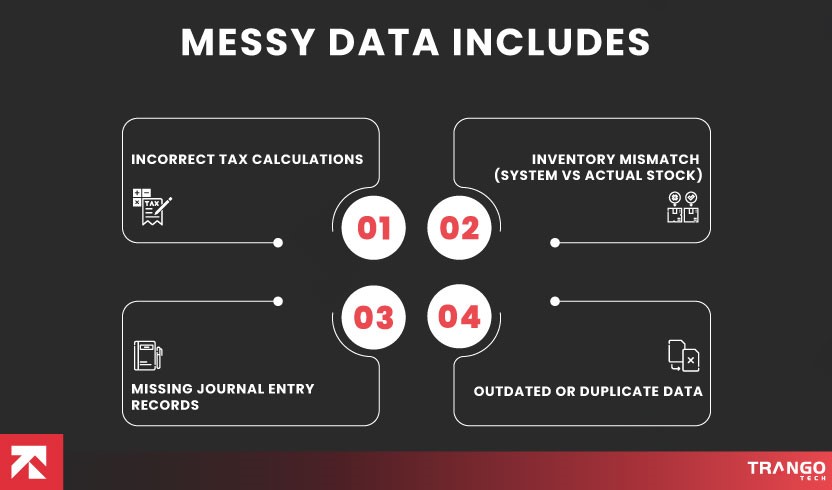
Messy data includes:
Also Read: Why “Out-of-the-Box” Business Central Fails Often
Before learning the data migration method, let’s go into the details of the challenges. The challenges are real and lead to taking the help of an experienced Dynamics 365 Partner.
The migration of messy data will lead to errors. The practice of loading all the legacy data into the new system without any audit creates problems. So the transfer of duplicate records, incorrect balances, and non-useable master data leads to performance issues. Data reliability is at stake, and the reports are not valid.
Underestimating costs can lead to budget overruns. Neglecting ERP pricing and cost for add-ons, data cleansing, integration, and training. While paying for Dynamics 365 Business Central implementation, businesses don’t initially seek a detailed cost breakdown, which leads to overspending.
End users of the system should be prepared to use it. But failing to do so will fail the ERP project. The employees’ hesitation to use the new system leads to a lack of understanding, and they are unwilling to step out of their comfort zone.
The situation resulting in the underutilization of the system leads to the failure of the project.
ERP migration is a crucial step, and partner selection has to be spot-on. Choosing the wrong Dynamics 365 ERP consulting partner will first impact the project’s delivery.
Migration is a critical process, and the partner must have a strong understanding of the system and its technical details. Sound knowledge of D365 Business Central migration services is significant for project success.
It is not a one-time process but a process that delivers long-term value.

Data migration seems easy, but it requires careful planning and execution. It is often mistaken as a technical exercise, but in reality, it is an important trust-building exercise.
Solutions are only applicable if the diagnosis is correct. We begin by analyzing the current state of the business to understand the workflow. Everything is analyzed, including tax, inventory, accounts, and balance data.
This leads to the identification of messy data that does not meet quality standards. High-risk areas are clearly visible, and we know what’s breaking the system.
Now we make a migration strategy that aligns with the business needs.
Migrating everything is not suitable, as it can lead to chaos. So we decide which data needs to be migrated.
Stakeholders from the Finance department are involved in discussing and deciding which data needs to be migrated.
Essential data is moved, while unnecessary data, such as obsolete master data, is abandoned.
Moreover, legacy data is archived for future audit and reference.
This step ensures that only clean, clear data is migrated to the system.
Even the best ERP system cannot perform well if the data entered into it is unreliable.
Data cleansing is yet another crucial step in the migration process. When compiling data from multiple sources, there is a high risk of duplication and mislabeling.
The results of this incorrect data call into question the credibility of the entire system. The algorithms also become unreliable if wrong data enters the system
Now we review all the records to identify duplicates, and we also identify missing fields. Customer and vendor tax numbers are standardized and saved.
We also analyze the charts of accounts to ensure the financial statements are accurate.
Inventory errors contribute significantly to system disruption. Issues in inventory data are corrected through information validation. Units, negative quantities, and costs are updated.
Data mapping from a legacy system to a new source serves as a conceptual bridge that connects, enabling seamless data flow between systems.
The same data is called by different names in two systems. So, correctly mapping the fields is significant for using the same data.
Mapping data also refers to consistency. The data is trustworthy and can be used without any doubts.
Our data mapping starts with matching the appropriate fields. We map rules to represent the relevant information. Transformations take place to ensure the format is updated. Data adjustment happens before it is transferred to the new system.
We do not take any risk by migrating it directly to the system. Instead, we use a sandbox environment to ensure the system’s integrity.
This helps us find any inefficiencies, such as inconsistent formatting and reconciliation problems. All these problems are then resolved until the desired results are achieved.
And we only proceed unless everything works perfectly. We try to solve all the problems iteratively.
This phased approach leads to accuracy and faster go-live.
We perform financial reconciliation to compare the results before and after migration.
In the event of any discrepancies, we identify and resolve them with the highest priority. This step helps to ensure that everything is working perfectly.
Parallel running of both systems is recommended for large organizations with complex needs. The key transactions are analyzed and validated in both systems.
Structured Go-live
We follow a structured go-live process with pre- and post-cutover planning to minimize disruption. The structured plan involves:
Detailed task scheduling
Defining a plan minute by minute.
Roles and responsibilities
Defining roles and actions for transformation, loading, and validation.
Dry runs
Simulation of the migration to identify anomalies.
Data validation
Defining a clear beginning and ending of each stage.
Communication plan
A clear plan must be put in place that has update and resolution plans.
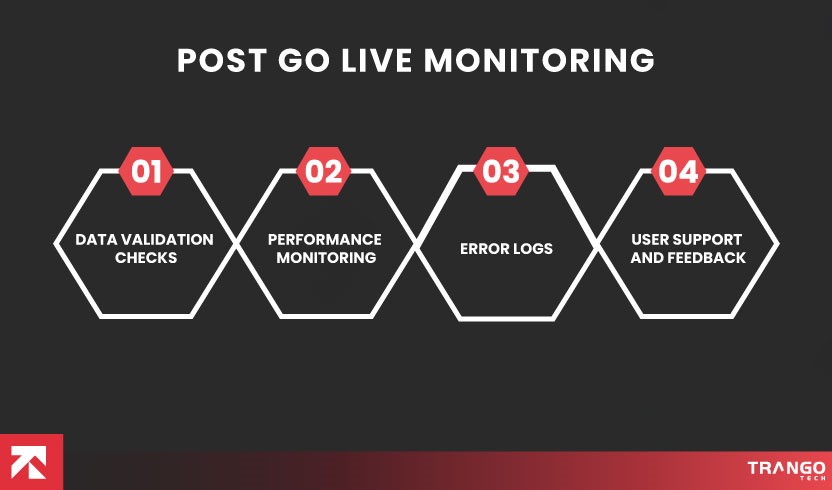
The initial weeks are very important after the system goes live. We are actively monitoring the system and validating everything. We ensure that any issues are identified and resolved on time before they escalate. This is the hypercare phase of the system that involves the Monitoring of:
Data integrity validation
Data validation across source and target systems to detect data loss or corruption.
Performance monitoring
Evaluation performance, and CRUD operations.
System functionality
Check if the critical business processes are performing well in the production environment.
Error logging
Monitoring log for errors or failures.
User acceptance and Feedback
Offering D365 Business Central support services to tackle issues by issuing support tickets.
This carefully designed migration methodology is not just another strategy but an amalgamation of expertise. We apply Microsoft best practices and offer D365 migration services to build the foundation of a strong business.
When implementing any of the top 20 ERP systems, this phased approach enables careful Monitoring and issue mitigation without disrupting the system. The system offers stakeholders complete reliability, trust, and confidence when making important decisions.
Messy legacy data needs to be handled with a thoroughly structured migration strategy that makes the data reliable for use. It serves as the foundation for a system that grows as the business scales.
We help you make the most of your investment with our expert migration strategy, which provides reliable information. From Dynamics 365 Shopify integration to migration or upgrade, data accuracy paves the way for success. Finance teams can make the most of this data to generate accurate reports and have data at their fingertips.
Why is the data messy?
Data is messy because, as the business grows, its data grows, but the system structure remains the same. It is not configured to handle the data load, and that leads to inefficiencies.
How is a legacy system working with messy data?
Legacy data stores all the financial data from posting transactions to generating reports. But it cannot offer consistency, reliability, and accuracy. You need to check everything manually.
What does it indicate when a business encounters messy data?
When an organization encounters messy data, it means the business is growing and has outgrown its system, requiring a system upgrade. It is actually a positive sign that it needs to handle growth by outgrowing system limitations.
Is it good to migrate messy data directly into Business Central?
Migrating data directly into Business Central will only lead to inefficiencies, such as incorrect reports, inventory numbers, etc.
Is it possible to automatically clean messy data in Business Central?
No business can automatically clean messy data.
When should a business clean messy data?
A business must clean the data during migration so that only clean data enters the system.
How does governance affect data quality?
Setting validation and ownership rules helps to maintain data quality in the long term.
What is the reason for the breakage of financial reports after ERP migration?
The breakage is the result of the inaccuracies in master data and opening balances.
How are data migration issues handled post-go-live?
We maintain the data through regular monitoring, setting validation rules, and standardizing master data.
How does clear data affect the implementation of the modern ERP system?
Acquiring the best ERP system will not solve your problems if you migrate bad data. It is the basic principle of a successful system.
What is the time frame to migrate data?
The time is not fixed because data migration depends on the volume of data.
Does messy data affect the audit?
Yes, messy data is unreliable, and the audits will be inaccurate but risky.
Calculate your complete ERP implementation cost using our cost calculator.
Calculate now!
Your Email Address Will not be published. Required Fields Are Marked
Quick Answer (TL;DR) Real-time inventory sync with ERP updates stock levels instantly across every sales channel whenever a…

Most growing businesses don’t have a software problem. They have a disconnection problem. Finance runs in one tool,…

Quick Answer (TL;DR) ERP systems solve real operational problems across 10 core business functions: finance, procurement, inventory, manufacturing,…
Quick Answer (TL;DR) Real-time inventory sync with ERP updates stock levels instantly across every sales channel whenever a…
Most growing businesses don’t have a software problem. They have a disconnection problem. Finance runs in one tool,…

Quick Answer (TL;DR) Dynamics 365 Outlook integration connects your Outlook inbox and calendar with Dynamics 365, so you…
If you are confused and need expert advice to transform your business, our experts are available 24/7.
Don't waste a single second, as you will be left behind while others are already ahead, moving fast. Start Now!
Trusted by Clients Worldwide: Rated 4.9 Star